

See
What Other People See On Your Facebook Timeline
In today’s article we will solve the
conundrum about how you can view your profile the way others sees it. While it
is not easy to determine who has viewed your profile on Facebook recently, you
can easily find out what another Facebook user would see if they visit your
profile. And
this simple little feature has important implications both for security and
marketing. So if you wish to view your profile the way others see it, follow
the steps listed below.
Why Check Out Your Profile As
Someone Else Might?
1. Security Reasons – Ensure friends are seeing the right stuff, others are only
seeing the allowed stuff, while the general public is not seeing too much and
the user you have blocked is not seeing anything.
2. Marketing – To the marketers and advertisers on Facebook, This is
something you cannot do without because you need to see how people see your
adverts, how admiring your posts are and so many other reasons regarding your
brand.
Viewing Your Timeline (Profile) As
Someone Else
We will
show you two different ways to navigate to the “view as” feature in this
section of the article.
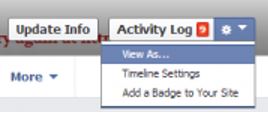
1. From your profile, click on your
name in the upper left hand corner of the Facebook page to go to your Facebook
Timeline. Near the lower right hand corner of your cover image, you will see a
settings icon click on this icon and a drop down selection will come up. In
this dropdown menu, select “View As…”
2. The second alternative to
navigate to the “view as” feature on your Facebook account is from the upper
right hand corner of your Facebook page after you sign in, you will notice a
little padlock icon just to the right of your name. Open up this dropdown. Then
select “Who can see my stuff“, and then click “What do other people
see on my timeline? View As…“

3. The “View As…” bar now shows up
near the top of your Facebook profile and indicates which privacy group
(Public… Friends of friends… Friends… and so on) or individual you are
currently viewing Facebook as. You can easily close it, once you are done, by
clicking the X.

Things to Check
When Viewing Your Facebook Profile As Someone Else
Well
everyone knows what he/she would like to check before trying this out, but let
us point out important things you need to check
1. Try to check Your Timeline Itself.
Look at individual posts
2. On the left sidebar on your
timeline, look at different options such as “likes” and “places” etc.
3. Tap on the About tab and look at
your “city”, “home town”, “places” “photos”, “email address”, “phone number”,
etc.
4. Lastly you can also check out the
“Friends” and “more” tab but most of these items are accounted for in the left
sidebar of the timeline at this time.
I hope you enjoyed viewing your
profile as others see it?
0 comments:
Post a Comment