• Facebook Tips
How to Install Facebook Marketplace Nearby Me App, How to Make Facebook Fan Page, How to Delete All Facebook Search History on FB , How to Login Instagram with Your Facebook , Marketplace Facebook Buy and Sell within Local Community – Marketplace Facebook Buy Sell , How to Deactivate FB Account Temporarily on Facebook, How to Find Blocked Facebook List to Unblock blocked Friends , How to Use the “Nearby Me Friends” FB Feature on Facebook , Facebook Customer Care Center & Email Help Supports Contact Addresses , How to Install Facebook Farmville Games
Showing posts with label View Blocked List. Show all posts

How do you see your blocked list on Facebook?

 View Blocked List     2 comments   

How do you see your blocked list on Facebook?: Maybe you had blocked your friend deliberately or erroneously and you want to reverse that action, all you have to do is to unblock that friend. So, do you want to know how you can unblock your blocked Facebook friend? We'll be showing you in a jiffy.

Smart Read: How to change your phone number to email on Facebook


How do you see your blocked list on Facebook?

How You Can Unblock Your blocked Facebook friends 


On A Facebook Application

  1. Tap on the menu button on the top of your Facebook page
  2. Scroll down to Account Settings
  3. Tap on "Blocking"  to show you a list of your blocked friends
  4. On the extended right of the name of the person you want to unblock and tap on "Unblock"
  5. On the screen that pops up, you will be asked if you are sure you want to unblock the person, tap on "Unblock"

Read Also: How to change your email address on Facebook


On A Browser 

  1. Click on    in the top right of your Facebook page
  2. Click on "Privacy Shortcuts"
  3. Click on "How do I stop someone from bothering me?"
  4. Click on "View All Blocked Users"
  5. Click on "Unblock" next to the name of the person you want to unblock.
  6. On the pop-up screen, you will be asked if you want to unblock the person, click on "Confirm" at the bottom of the pop-up screen to unblock that Facebook friend.

READ ALSO: How to remove number on Facebook


If you have any problem understanding the steps given above, please do not hesitate to seek help by using the comment box below.


Please share this article with friends to encourage us do more. Thank You!
Read More
  • Share This:  
  •  Facebook
  •  Twitter
  •  Google+
  •  Stumble
  •  Digg

How To View Blocked List On Facebook | See FB Blocked List and Unblock Friends

 Blocked List, View Blocked List     1 comment   

How To View Blocked List On Facebook | See FB Blocked List & Unblock Friends: Want to find out where your blocked friends are on Facebook? We will see how to check Facebook blocked users list so you can decide whether to unblock them or not.

Facebook allows you to block and unblock people. You can block anyone bothering on you Facebook.


How To View Blocked List On Facebook | See FB Blocked List & Unblock Friends


Recommended: How can i delete my Facebook account permanently?

So how do you go about accessing those friends or Facebook users that you've blocked? We shall see how to locate users blocked by you on FB.

Joke: 
Your future spouse might be on your Facebook blocked list. Sometimes go to your Facebook Blocked List just to see how your prisoners are doing. 


Quick Read:
How to Deactivate My Facebook Account

How To Locate Your Blocked List On Facebook

Below are the steps to be taken in order to view all your blocked list.

To view your Facebook block list:
  1. Click in the top right of any Facebook page
  2. Click Privacy Shortcuts
  3. Click How do I stop someone from bothering me?
  4. Click View All Blocked Users.
For more Facebook tips, visit JEELDA.COM 

Please share this guide with your loved ones. Thank you!
Read More
  • Share This:  
  •  Facebook
  •  Twitter
  •  Google+
  •  Stumble
  •  Digg

How to See Who Views Your Facebook Profile

 Facebook, View Blocked List     No comments   

Learn How to See Who Views Your Facebook Profile?: Most users are interested in seeing which Facebook friend or user is viewing their Facebook profile. While there are some programs and browser extension claiming that they can track who is stalking you on Facebook, there are some elements of scams in their activities. Ensure that you don’t give any access to your account because it may compromise your Facebook privacy. View Facebook Blocked List


How to See Who Views Your Facebook Profile?

Unlike other social media, like LinkedIn, you can easily see who’s viewed your profile using the provided tool, but Facebook still not ready to show that feature, although many users wanted to have that.
Is there a way to find out who always viewing my Facebook profile?

While searching and finding a way to see who are checking Facebook profile or if it is possible, I came across in some popular way that are shared online.


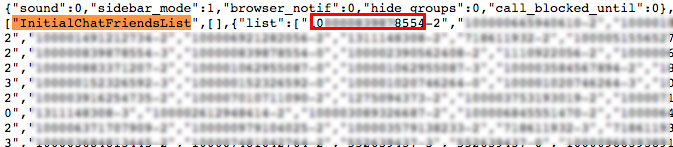
Many videos with millions of views and popular pages, sharing the same instruction how to find out who is viewing your Facebook profile, they use InitialChatFriendsList.

This can be found when viewing the source code for your profile and the list of the numbers that follows is the list of ID’s that arranged from top which said the one who constantly viewing your profile.

I will tell you the truth this method is not exactly the list of people that are constantly viewing your profile, instead this is the list of friends that you have recently interacted with (in chat, message, comment thread).

Why I said this is not the list who recently check your profile? Because I tested it, I tell some of my friends to check my profile for some times and check if the list changed, it didn’t.
How to find InitialChatFriendsList

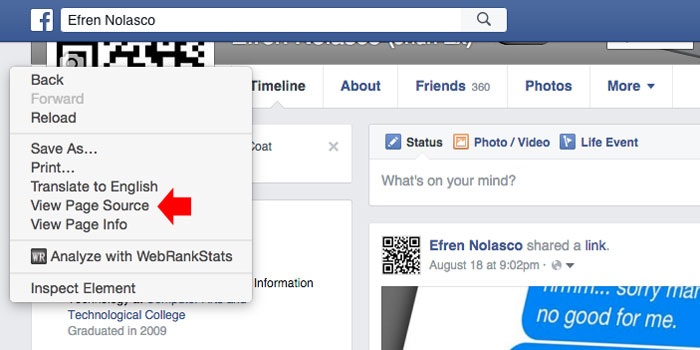
If you still wanted to check using the InitialChatFriendsList, I will share with you the steps. 1. On your Facebook Profile, perform right-click in the empty area on the side, then select “View Page Source”

See:

  • How you can change your Facebook password
  • How to delete Facebook post


2. It will open the page source of your profile, to find the list simple press CTRL + F (Windows) or Command + F (Mac) and enter InitialChatFriendsList then press enter. You will be taken to the list of code which is Facebook ID’s of your friends.


3. To convert numbers into Facebook profiles, simply put this into your browser address bar https://www.facebook.com/NUMBERID, and change the NUMBERID with the first group digit numbers that you find right after InitialChatFriendsList, do not include number after hyphen (-).


If you are checking source code, and it seems complicated to you, then, you can actually see this visually using chat window. If you are using Facebook in browser, you will see on right side your friends list. You can also use this to observe who you constantly chat with like the InitialChatFriendsList.

What you have to do is turn off the chat and then refresh your web browser, then turn it back on again using the gear icon. The first friend that appears on the top is most likely to be your Facebook friends that you recently interact with.
Read More
  • Share This:  
  •  Facebook
  •  Twitter
  •  Google+
  •  Stumble
  •  Digg

How To View My Blocked List On Facebook

 Block, Blocked List, Unblock, View Blocked List     2 comments   

How To See Your Blocked List On Facebook: One thing is to create a Facebook profile another thing is in the usage. Sometimes you add friends who turns out be a snake in the green grass and so you decided to block them.
And sometimes because of how frequent people tend to break your heart so you decide to block even people are innocent.... so you want to go back to cross check if you've mistakenly block your true friend.  How do you get there? This post will help you figure out!


How To See Your Blocked List On Facebook


How To See Your Blocked List On Facebook


When you unblock someone, that person will be able to see your posts on Facebook that you share with the public. The person won't automatically become your friend on Facebook. If you want to become friends with a person who you've unblocked, you'll need to send them a friend request.
To unblock someone:
  1. Click in the top right of any Facebook page

  2. Click Privacy Shortcuts
  3. Click How do I stop someone from bothering me?
  4. Click View All Blocked Users.
  5. Click Unblock next to the name of the person you want to unblock.

It's your choice to unblock them when you see your blocked list on Facebook. Cheers! Please share this article.

If you find this article confusing, then see our other resource pages:

  • How To Unblock Friends And People On Facebook
  • Where to see blocked list on Facebook
  • How to block someone on Facebook Messenger 
 Or leave your comment below. Please share!!!
Read More
  • Share This:  
  •  Facebook
  •  Twitter
  •  Google+
  •  Stumble
  •  Digg

How to Block a Facebook Friend

 Block Facebook Friend, Blocked, Blocked List, Facebook, How to, View Blocked List     1 comment   

So a friend is getting on your nerves on Facebook right? See how to block them from bothering you in this article. See: How to Block friends Apps on Facebook.

How to Block a Facebook Friend


In this latest Facebook Basics post, we shall see how to stop stalkers from bothering Facebook users. You can block someone for so many reasons so I leave that for you to decide but below are the major reasons some of us block Facebook friends.

  • Friends with frequent annoying status updates.
  • Ex that bothers
  • Friends that spams your inbox
  • Account suspected to be a fraudster 
  • etc.
What ever is the reason, Facebook has an option for you to block them.

  • Note that you can always unblock people on your blocked list any time you want.
  • Keep in mind that whenever you block a Facebook friend and you want to later unblock them, you will have to resend them a new friend request.
  • Don't bother, people you block won't be notified

How can I quickly block people bothering me?

To block them, follow these steps below:

  1. Click at the top right of any Facebook page.
  2. Click Privacy Shortcuts
  3. Click How do I stop someone from bothering me?
  4. Enter the name of the person you want to block and click Block
  5. Select the specific person you want to block from the list that appears and click Block again

Smart recommendation:
  • How to Delete A Facebook Group
  • How to Delete Facebook Photo Album

What Happens When I Block Someone?


People you block on Facebook won't be able to do any of the following:
  • See things you post on your profile
  • Invite you to events or groups
  • Add you as a friend
  • Tag you in posts, comments or photos
  • Start a conversation with you

Please spread this article by sharing. Thanks!
Read More
  • Share This:  
  •  Facebook
  •  Twitter
  •  Google+
  •  Stumble
  •  Digg

How To View Your Blocked List On Facebook

 Blocked, Blocked List, Facebook, Facebook List, View Blocked List     No comments   

Want to find those you blocked on Facebook so you can unblock them? Once in a long while, it's okay to visit those people on your blocked list to make certain that you didn't actually blocked them in error.


Facebook is a social network that runs via the power of friendship - blocking so many people won't help you and not blocking annoying Facebook friends won't be an option either. 

Recommended: How can i delete my Facebook account permanently?


So how do you go about accessing those friends or Facebook users that you've blocked? We shall see how to locate users blocked by you on FB.


How To View Your Blocked List On Facebook


Joke: 
Your future spouse might be on your Facebook blocked list.
Sometimes go to your Facebook Blocked List just to see how your prisoners are doing.


Quick Read:

  • How to Deactivate My Facebook Account
  • How to uninstall and install Fb
  • How to remove phone number on Facebook
  • Changing your Password and how to do it

How To Locate Your Blocked List On Facebook

Below are the steps to be taken in order to view all your blocked list.

To view your Facebook block list:
  1. Click in the top right of any Facebook page
  2. Click Privacy Shortcuts
  3. Click How do I stop someone from bothering me?
  4. Click View All Blocked Users.
For more Facebook tips, visit JEELDA.COM 

Please share this guide. Thank you!
Read More
  • Share This:  
  •  Facebook
  •  Twitter
  •  Google+
  •  Stumble
  •  Digg

How To View Your Blocked List On Facebook

 Blocked, Blocked List, Facebook, Facebook List, View Blocked List     No comments   

Want to find those you blocked on Facebook so you can unblock them? Once in a long while, it's okay to visit those people on your blocked list to make certain that you didn't actually blocked them in error.


Facebook is a social network that runs via the power of friendship - blocking so many people won't help you and not blocking annoying Facebook friends won't be an option either. 

Recommended: How can i delete my Facebook account permanently?


So how do you go about accessing those friends or Facebook users that you've blocked? We shall see how to locate users blocked by you on FB.


How To View Your Blocked List On Facebook


Joke: 
Your future spouse might be on your Facebook blocked list.
Sometimes go to your Facebook Blocked List just to see how your prisoners are doing.


Quick Read:

  • How to Deactivate My Facebook Account
  • How to uninstall and install Fb
  • How to remove phone number on Facebook
  • Changing your Password and how to do it

How To Locate Your Blocked List On Facebook

Below are the steps to be taken in order to view all your blocked list.

To view your Facebook block list:
  1. Click in the top right of any Facebook page
  2. Click Privacy Shortcuts
  3. Click How do I stop someone from bothering me?
  4. Click View All Blocked Users.
For more Facebook tips, visit JEELDA.COM 

Please share this guide. Thank you!
Read More
  • Share This:  
  •  Facebook
  •  Twitter
  •  Google+
  •  Stumble
  •  Digg

How to Block a Facebook Friend

 Block Facebook Friend, Blocked, Blocked List, Facebook, How to, View Blocked List     No comments   

So a friend is getting on your nerves on Facebook right? See how to block them from bothering you in this article. See: How to Block friends Apps on Facebook.

How to Block a Facebook Friend


In this latest Facebook Basics post, we shall see how to stop stalkers from bothering Facebook users. You can block someone for so many reasons so I leave that for you to decide but below are the major reasons some of us block Facebook friends.

  • Friends with frequent annoying status updates.
  • Ex that bothers
  • Friends that spams your inbox
  • Account suspected to be a fraudster 
  • etc.
What ever is the reason, Facebook has an option for you to block them.

  • Note that you can always unblock people on your blocked list any time you want.
  • Keep in mind that whenever you block a Facebook friend and you want to later unblock them, you will have to resend them a new friend request.
  • Don't bother, people you block won't be notified

How can I quickly block people bothering me?

To block them, follow these steps below:

  1. Click at the top right of any Facebook page.
  2. Click Privacy Shortcuts
  3. Click How do I stop someone from bothering me?
  4. Enter the name of the person you want to block and click Block
  5. Select the specific person you want to block from the list that appears and click Block again

Smart recommendation:
  • How to Delete A Facebook Group
  • How to Delete Facebook Photo Album

What Happens When I Block Someone?


People you block on Facebook won't be able to do any of the following:
  • See things you post on your profile
  • Invite you to events or groups
  • Add you as a friend
  • Tag you in posts, comments or photos
  • Start a conversation with you

Please spread this article by sharing. Thanks!
Read More
  • Share This:  
  •  Facebook
  •  Twitter
  •  Google+
  •  Stumble
  •  Digg

How To See Your Blocked List On Facebook

 Block, Blocked List, Unblock, View Blocked List     1 comment   

How To See Your Blocked List On Facebook: One thing is to create a Facebook profile another thing is in the usage. Sometimes you add friends who turns out be a snake in the green grass and so you decided to block them.
And sometimes because of how frequent people tend to break your heart so you decide to block even people are innocent.... so you want to go back to cross check if you've mistakenly block your true friend.  How do you get there? This post will help you figure out!


How To See Your Blocked List On Facebook


How To See Your Blocked List On Facebook


When you unblock someone, that person will be able to see your posts on Facebook that you share with the public. The person won't automatically become your friend on Facebook. If you want to become friends with a person who you've unblocked, you'll need to send them a friend request.
To unblock someone:
  1. Click in the top right of any Facebook page
  2. Click Privacy Shortcuts
  3. Click How do I stop someone from bothering me?
  4. Click View All Blocked Users.
  5. Click Unblock next to the name of the person you want to unblock.

It's your choice to unblock them when you see your blocked list on Facebook. Cheers! Please share this article.

If you find this article confusing, then see our other resource pages:

  • How To Unblock Friends And People On Facebook
  • Where to see blocked list on Facebook
  • How to block someone on Facebook Messenger 
 Or leave your comment below. Please share!!!
Read More
  • Share This:  
  •  Facebook
  •  Twitter
  •  Google+
  •  Stumble
  •  Digg

How to See Who Views Your Facebook Profile

 Facebook, View Blocked List     No comments   

Learn How to See Who Views Your Facebook Profile?: Most users are interested in seeing which Facebook friend or user is viewing their Facebook profile. While there are some programs and browser extension claiming that they can track who is stalking you on Facebook, there are some elements of scams in their activities. Ensure that you don’t give any access to your account because it may compromise your Facebook privacy. View Facebook Blocked List


How to See Who Views Your Facebook Profile?

Unlike other social media, like LinkedIn, you can easily see who’s viewed your profile using the provided tool, but Facebook still not ready to show that feature, although many users wanted to have that.
Is there a way to find out who always viewing my Facebook profile?

While searching and finding a way to see who are checking Facebook profile or if it is possible, I came across in some popular way that are shared online.


Many videos with millions of views and popular pages, sharing the same instruction how to find out who is viewing your Facebook profile, they use InitialChatFriendsList.

This can be found when viewing the source code for your profile and the list of the numbers that follows is the list of ID’s that arranged from top which said the one who constantly viewing your profile.

I will tell you the truth this method is not exactly the list of people that are constantly viewing your profile, instead this is the list of friends that you have recently interacted with (in chat, message, comment thread).

Why I said this is not the list who recently check your profile? Because I tested it, I tell some of my friends to check my profile for some times and check if the list changed, it didn’t.
How to find InitialChatFriendsList

If you still wanted to check using the InitialChatFriendsList, I will share with you the steps. 1. On your Facebook Profile, perform right-click in the empty area on the side, then select “View Page Source”

See:

  • How you can change your Facebook password
  • How to delete Facebook post


2. It will open the page source of your profile, to find the list simple press CTRL + F (Windows) or Command + F (Mac) and enter InitialChatFriendsList then press enter. You will be taken to the list of code which is Facebook ID’s of your friends.


3. To convert numbers into Facebook profiles, simply put this into your browser address bar https://www.facebook.com/NUMBERID, and change the NUMBERID with the first group digit numbers that you find right after InitialChatFriendsList, do not include number after hyphen (-).


If you are checking source code, and it seems complicated to you, then, you can actually see this visually using chat window. If you are using Facebook in browser, you will see on right side your friends list. You can also use this to observe who you constantly chat with like the InitialChatFriendsList.

What you have to do is turn off the chat and then refresh your web browser, then turn it back on again using the gear icon. The first friend that appears on the top is most likely to be your Facebook friends that you recently interact with.
Read More
  • Share This:  
  •  Facebook
  •  Twitter
  •  Google+
  •  Stumble
  •  Digg

How To View Blocked List On Facebook | See FB Blocked List & Unblock Friends

 Blocked List, View Blocked List     1 comment   

How To View Blocked List On Facebook | See FB Blocked List & Unblock Friends: Want to find out where your blocked friends are on Facebook? We will see how to check Facebook blocked users list so you can decide whether to unblock them or not.

Facebook allows you to block and unblock people. You can block anyone bothering on you Facebook.


How To View Blocked List On Facebook | See FB Blocked List & Unblock Friends


Recommended: How can i delete my Facebook account permanently?

So how do you go about accessing those friends or Facebook users that you've blocked? We shall see how to locate users blocked by you on FB.

Joke: 
Your future spouse might be on your Facebook blocked list. Sometimes go to your Facebook Blocked List just to see how your prisoners are doing. 


Quick Read:
How to Deactivate My Facebook Account

How To Locate Your Blocked List On Facebook

Below are the steps to be taken in order to view all your blocked list.

To view your Facebook block list:
  1. Click in the top right of any Facebook page
  2. Click Privacy Shortcuts
  3. Click How do I stop someone from bothering me?
  4. Click View All Blocked Users.
For more Facebook tips, visit JEELDA.COM 

Please share this guide with your loved ones. Thank you!
Read More
  • Share This:  
  •  Facebook
  •  Twitter
  •  Google+
  •  Stumble
  •  Digg

How To See Your Blocked List On Facebook

 Block, Blocked List, Unblock, View Blocked List     2 comments   

How To See Your Blocked List On Facebook: One thing is to create a Facebook profile another thing is in the usage. Sometimes you add friends who turns out be a snake in the green grass and so you decided to block them.
And sometimes because of how frequent people tend to break your heart so you decide to block even people are innocent.... so you want to go back to cross check if you've mistakenly block your true friend.  How do you get there? This post will help you figure out!


How To See Your Blocked List On Facebook


How To See Your Blocked List On Facebook


When you unblock someone, that person will be able to see your posts on Facebook that you share with the public. The person won't automatically become your friend on Facebook. If you want to become friends with a person who you've unblocked, you'll need to send them a friend request.
To unblock someone:
  1. Click in the top right of any Facebook page
  2. Click Privacy Shortcuts
  3. Click How do I stop someone from bothering me?
  4. Click View All Blocked Users.
  5. Click Unblock next to the name of the person you want to unblock.

It's your choice to unblock them when you see your blocked list on Facebook. Cheers! Please share this article.

If you find this article confusing, then see our other resource pages:

  • How To Unblock Friends And People On Facebook
  • Where to see blocked list on Facebook
  • How to block someone on Facebook Messenger 
 Or leave your comment below. Please share!!!
Read More
  • Share This:  
  •  Facebook
  •  Twitter
  •  Google+
  •  Stumble
  •  Digg

How to See Who Views Your Facebook Profile

 Facebook, View Blocked List     No comments   

Learn How to See Who Views Your Facebook Profile?: Most users are interested in seeing which Facebook friend or user is viewing their Facebook profile. While there are some programs and browser extension claiming that they can track who is stalking you on Facebook, there are some elements of scams in their activities. Ensure that you don’t give any access to your account because it may compromise your Facebook privacy. View Facebook Blocked List


How to See Who Views Your Facebook Profile?

Unlike other social media, like LinkedIn, you can easily see who’s viewed your profile using the provided tool, but Facebook still not ready to show that feature, although many users wanted to have that.
Is there a way to find out who always viewing my Facebook profile?

While searching and finding a way to see who are checking Facebook profile or if it is possible, I came across in some popular way that are shared online.


Many videos with millions of views and popular pages, sharing the same instruction how to find out who is viewing your Facebook profile, they use InitialChatFriendsList.

This can be found when viewing the source code for your profile and the list of the numbers that follows is the list of ID’s that arranged from top which said the one who constantly viewing your profile.

I will tell you the truth this method is not exactly the list of people that are constantly viewing your profile, instead this is the list of friends that you have recently interacted with (in chat, message, comment thread).

Why I said this is not the list who recently check your profile? Because I tested it, I tell some of my friends to check my profile for some times and check if the list changed, it didn’t.
How to find InitialChatFriendsList

If you still wanted to check using the InitialChatFriendsList, I will share with you the steps. 1. On your Facebook Profile, perform right-click in the empty area on the side, then select “View Page Source”

See:

  • How you can change your Facebook password
  • How to delete Facebook post


2. It will open the page source of your profile, to find the list simple press CTRL + F (Windows) or Command + F (Mac) and enter InitialChatFriendsList then press enter. You will be taken to the list of code which is Facebook ID’s of your friends.


3. To convert numbers into Facebook profiles, simply put this into your browser address bar https://www.facebook.com/NUMBERID, and change the NUMBERID with the first group digit numbers that you find right after InitialChatFriendsList, do not include number after hyphen (-).


If you are checking source code, and it seems complicated to you, then, you can actually see this visually using chat window. If you are using Facebook in browser, you will see on right side your friends list. You can also use this to observe who you constantly chat with like the InitialChatFriendsList.

What you have to do is turn off the chat and then refresh your web browser, then turn it back on again using the gear icon. The first friend that appears on the top is most likely to be your Facebook friends that you recently interact with.
Read More
  • Share This:  
  •  Facebook
  •  Twitter
  •  Google+
  •  Stumble
  •  Digg

How To View Blocked List On Facebook | See FB Blocked List & Unblock Friends

 Blocked List, View Blocked List     No comments   

How To View Blocked List On Facebook | See FB Blocked List & Unblock Friends: Want to find out where your blocked friends are on Facebook? We will see how to check Facebook blocked users list so you can decide whether to unblock them or not.

Facebook allows you to block and unblock people. You can block anyone bothering on you Facebook.


How To View Blocked List On Facebook | See FB Blocked List & Unblock Friends


Recommended: How can i delete my Facebook account permanently?

So how do you go about accessing those friends or Facebook users that you've blocked? We shall see how to locate users blocked by you on FB.

Joke: 
Your future spouse might be on your Facebook blocked list. Sometimes go to your Facebook Blocked List just to see how your prisoners are doing. 


Quick Read:
How to Deactivate My Facebook Account

How To Locate Your Blocked List On Facebook

Below are the steps to be taken in order to view all your blocked list.

To view your Facebook block list:
  1. Click in the top right of any Facebook page
  2. Click Privacy Shortcuts
  3. Click How do I stop someone from bothering me?
  4. Click View All Blocked Users.
For more Facebook tips, visit JEELDA.COM 

Please share this guide with your loved ones. Thank you!
Read More
  • Share This:  
  •  Facebook
  •  Twitter
  •  Google+
  •  Stumble
  •  Digg

How To View Blocked List On Facebook | See FB Blocked List & Unblock Friends

 Blocked List, View Blocked List     No comments   

How To View Blocked List On Facebook | See FB Blocked List & Unblock Friends: Want to find out where your blocked friends are on Facebook? We will see how to check Facebook blocked users list so you can decide whether to unblock them or not.

Facebook allows you to block and unblock people. You can block anyone bothering on you Facebook.


How To View Blocked List On Facebook | See FB Blocked List & Unblock Friends


Recommended: How can i delete my Facebook account permanently?

So how do you go about accessing those friends or Facebook users that you've blocked? We shall see how to locate users blocked by you on FB.

Joke: 
Your future spouse might be on your Facebook blocked list. Sometimes go to your Facebook Blocked List just to see how your prisoners are doing. 


Quick Read:
How to Deactivate My Facebook Account

How To Locate Your Blocked List On Facebook

Below are the steps to be taken in order to view all your blocked list.

To view your Facebook block list:
  1. Click in the top right of any Facebook page
  2. Click Privacy Shortcuts
  3. Click How do I stop someone from bothering me?
  4. Click View All Blocked Users.
For more Facebook tips, visit JEELDA.COM 

Please share this guide with your loved ones. Thank you!
Read More
  • Share This:  
  •  Facebook
  •  Twitter
  •  Google+
  •  Stumble
  •  Digg

How To View Blocked List On Facebook | See FB Blocked List & Unblock Friends

 Blocked List, View Blocked List     No comments   

How To View Blocked List On Facebook | See FB Blocked List & Unblock Friends: Want to find out where your blocked friends are on Facebook? We will see how to check Facebook blocked users list so you can decide whether to unblock them or not.

Facebook allows you to block and unblock people. You can block anyone bothering on you Facebook.


How To View Blocked List On Facebook | See FB Blocked List & Unblock Friends


Recommended: How can i delete my Facebook account permanently?

So how do you go about accessing those friends or Facebook users that you've blocked? We shall see how to locate users blocked by you on FB.

Joke: 
Your future spouse might be on your Facebook blocked list. Sometimes go to your Facebook Blocked List just to see how your prisoners are doing. 


Quick Read:
How to Deactivate My Facebook Account

How To Locate Your Blocked List On Facebook

Below are the steps to be taken in order to view all your blocked list.

To view your Facebook block list:
  1. Click in the top right of any Facebook page
  2. Click Privacy Shortcuts
  3. Click How do I stop someone from bothering me?
  4. Click View All Blocked Users.
For more Facebook tips, visit JEELDA.COM 

Please share this guide with your loved ones. Thank you!
Read More
  • Share This:  
  •  Facebook
  •  Twitter
  •  Google+
  •  Stumble
  •  Digg

How To View Your Blocked List On Facebook

 Blocked, Blocked List, Facebook, Facebook List, View Blocked List     No comments   

Want to find those you blocked on Facebook so you can unblock them? Once in a long while, it's okay to visit those people on your blocked list to make certain that you didn't actually blocked them in error.


Facebook is a social network that runs via the power of friendship - blocking so many people won't help you and not blocking annoying Facebook friends won't be an option either. 

Recommended: How can i delete my Facebook account permanently?


So how do you go about accessing those friends or Facebook users that you've blocked? We shall see how to locate users blocked by you on FB.


How To View Your Blocked List On Facebook


Joke: 
Your future spouse might be on your Facebook blocked list.
Sometimes go to your Facebook Blocked List just to see how your prisoners are doing.


Quick Read:

  • How to Deactivate My Facebook Account
  • How to uninstall and install Fb
  • How to remove phone number on Facebook
  • Changing your Password and how to do it

How To Locate Your Blocked List On Facebook

Below are the steps to be taken in order to view all your blocked list.

To view your Facebook block list:
  1. Click in the top right of any Facebook page
  2. Click Privacy Shortcuts
  3. Click How do I stop someone from bothering me?
  4. Click View All Blocked Users.
For more Facebook tips, visit JEELDA.COM 

Please share this guide. Thank you!
Read More
  • Share This:  
  •  Facebook
  •  Twitter
  •  Google+
  •  Stumble
  •  Digg

How to Block a Facebook Friend

 Block Facebook Friend, Blocked, Blocked List, Facebook, How to, View Blocked List     No comments   

So a friend is getting on your nerves on Facebook right? See how to block them from bothering you in this article. See: How to Block friends Apps on Facebook.

How to Block a Facebook Friend


In this latest Facebook Basics post, we shall see how to stop stalkers from bothering Facebook users. You can block someone for so many reasons so I leave that for you to decide but below are the major reasons some of us block Facebook friends.

  • Friends with frequent annoying status updates.
  • Ex that bothers
  • Friends that spams your inbox
  • Account suspected to be a fraudster 
  • etc.
What ever is the reason, Facebook has an option for you to block them.

  • Note that you can always unblock people on your blocked list any time you want.
  • Keep in mind that whenever you block a Facebook friend and you want to later unblock them, you will have to resend them a new friend request.
  • Don't bother, people you block won't be notified

How can I quickly block people bothering me?

To block them, follow these steps below:

  1. Click at the top right of any Facebook page.
  2. Click Privacy Shortcuts
  3. Click How do I stop someone from bothering me?
  4. Enter the name of the person you want to block and click Block
  5. Select the specific person you want to block from the list that appears and click Block again

Smart recommendation:
  • How to Delete A Facebook Group
  • How to Delete Facebook Photo Album

What Happens When I Block Someone?


People you block on Facebook won't be able to do any of the following:
  • See things you post on your profile
  • Invite you to events or groups
  • Add you as a friend
  • Tag you in posts, comments or photos
  • Start a conversation with you

Please spread this article by sharing. Thanks!
Read More
  • Share This:  
  •  Facebook
  •  Twitter
  •  Google+
  •  Stumble
  •  Digg

How To See Your Blocked List On Facebook

 Block, Blocked List, Unblock, View Blocked List     2 comments   

How To See Your Blocked List On Facebook: One thing is to create a Facebook profile another thing is in the usage. Sometimes you add friends who turns out be a snake in the green grass and so you decided to block them.
And sometimes because of how frequent people tend to break your heart so you decide to block even people are innocent.... so you want to go back to cross check if you've mistakenly block your true friend.  How do you get there? This post will help you figure out!


How To See Your Blocked List On Facebook


How To See Your Blocked List On Facebook


When you unblock someone, that person will be able to see your posts on Facebook that you share with the public. The person won't automatically become your friend on Facebook. If you want to become friends with a person who you've unblocked, you'll need to send them a friend request.
To unblock someone:
  1. Click in the top right of any Facebook page
  2. Click Privacy Shortcuts
  3. Click How do I stop someone from bothering me?
  4. Click View All Blocked Users.
  5. Click Unblock next to the name of the person you want to unblock.

It's your choice to unblock them when you see your blocked list on Facebook. Cheers! Please share this article.

If you find this article confusing, then see our other resource pages:

  • How To Unblock Friends And People On Facebook
  • Where to see blocked list on Facebook
  • How to block someone on Facebook Messenger 
 Or leave your comment below. Please share!!!
Read More
  • Share This:  
  •  Facebook
  •  Twitter
  •  Google+
  •  Stumble
  •  Digg

How to See Who Views Your Facebook Profile

 Facebook, View Blocked List     No comments   

Learn How to See Who Views Your Facebook Profile?: Most users are interested in seeing which Facebook friend or user is viewing their Facebook profile. While there are some programs and browser extension claiming that they can track who is stalking you on Facebook, there are some elements of scams in their activities. Ensure that you don’t give any access to your account because it may compromise your Facebook privacy. View Facebook Blocked List


How to See Who Views Your Facebook Profile?

Unlike other social media, like LinkedIn, you can easily see who’s viewed your profile using the provided tool, but Facebook still not ready to show that feature, although many users wanted to have that.
Is there a way to find out who always viewing my Facebook profile?

While searching and finding a way to see who are checking Facebook profile or if it is possible, I came across in some popular way that are shared online.


Many videos with millions of views and popular pages, sharing the same instruction how to find out who is viewing your Facebook profile, they use InitialChatFriendsList.

This can be found when viewing the source code for your profile and the list of the numbers that follows is the list of ID’s that arranged from top which said the one who constantly viewing your profile.

I will tell you the truth this method is not exactly the list of people that are constantly viewing your profile, instead this is the list of friends that you have recently interacted with (in chat, message, comment thread).

Why I said this is not the list who recently check your profile? Because I tested it, I tell some of my friends to check my profile for some times and check if the list changed, it didn’t.
How to find InitialChatFriendsList

If you still wanted to check using the InitialChatFriendsList, I will share with you the steps. 1. On your Facebook Profile, perform right-click in the empty area on the side, then select “View Page Source”

See:

  • How you can change your Facebook password
  • How to delete Facebook post


2. It will open the page source of your profile, to find the list simple press CTRL + F (Windows) or Command + F (Mac) and enter InitialChatFriendsList then press enter. You will be taken to the list of code which is Facebook ID’s of your friends.


3. To convert numbers into Facebook profiles, simply put this into your browser address bar https://www.facebook.com/NUMBERID, and change the NUMBERID with the first group digit numbers that you find right after InitialChatFriendsList, do not include number after hyphen (-).


If you are checking source code, and it seems complicated to you, then, you can actually see this visually using chat window. If you are using Facebook in browser, you will see on right side your friends list. You can also use this to observe who you constantly chat with like the InitialChatFriendsList.

What you have to do is turn off the chat and then refresh your web browser, then turn it back on again using the gear icon. The first friend that appears on the top is most likely to be your Facebook friends that you recently interact with.
Read More
  • Share This:  
  •  Facebook
  •  Twitter
  •  Google+
  •  Stumble
  •  Digg
Older Posts Home
How to Install Facebook Marketplace Near Me App

How to Create a Facebook Business Page

How to Completely Delete Facebook Search History

How to Sign in or Login Instagram with Your Facebook

Marketplace Facebook Buy and Sell within Local Community – Marketplace Facebook Buy Sell App

How to Deactivate FB Account Temporarily on Facebook

How to Find Blocked Facebook List to Unblock blocked Friends

How to Use the “Near Me Friends” Facebook Feature

FB Customer Care Center & Email Help Supports Contact Addresses

How to Install & Play the Facebook Farmville Games
How to Install Facebook Marketplace Near Me App

How to Create a Facebook Business Page

How to Completely Delete Facebook Search History

How to Sign in or Login Instagram with Your Facebook

Marketplace Facebook Buy and Sell within Local Community – Marketplace Facebook Buy Sell App

How to Deactivate FB Account Temporarily on Facebook

How to Find Blocked Facebook List to Unblock blocked Friends

How to Use the “Near Me Friends” Facebook Feature

FB Customer Care Center & Email Help Supports Contact Addresses

How to Install & Play the Facebook Farmville Games

Enter your email address:

Other resources

  • Facebook open graph debugger
  • How to delete Facebook account permanently

Blog Archive

  • ▼  2019 (139)
    • ▼  March (129)
      • How to Create a Facebook Store
      • Pinterest Login with Facebook
      • Delete Your Facebook Account
      • Learn How To View Blocked List on Facebook and Unb...
      • Close My Facebook Account
      • Facebook Hidden Friends
      • Instagram Register Online
      • How To Permanently Deactivate My Facebook Account
      • How to See Private Facebook Profile
      • Facebook Mobile Full Site
      • Who Viewed My Facebook Profile
      • Can Facebook Cause Depression
      • How To Invite All Friends To A Facebook Event
      • How to Delete Facebook Activity Log
      • Unfriend On Facebook
      • How To Join Facebook As A Business
      • How To Change My Facebook Photo
      • How To Change Mobile Number On Facebook
      • Change Facebook Language Back To English
      • The Facebook Market – Facebook Marketplace
      • How Use the Facebook Marketplace
      • Create my own Facebook page
      • Open New Facebook Account
      • Facebook free marketplace community
      • How to Sell Car on Marketplace
      • www.Facebook News Feed Settings
      • How to Save Facebook Images
      • Facebook for iPhone free
      • Use WCW on Facebook
      • Join Marketplace Buy and Sell
      • Facebook Games List On Facebook Gameroom
      • Report Peoples Post On Facebook Reporting Center
      • Facebook Hooking up Platform
      • How to Report Facebook Account
      • Visit the Facebook Help Center
      • Facebook Developers – What Is Facebook Developer
      • Facebook Hook 2019
      • Create a Facebook birthday fundraiser
      • How to Cancel Facebook Account
      • How to Unblock Your Friend On Facebook
      • How Can I Find My Facebook Password Without Changi...
      • Facebook Log In
      • How do I Download Instagram On Mac
      • Log In Facebook.com
      • Instagram Followers Free
      • Find Deleted Messages On Facebook
      • Font Changer Online for Facebook
      • Www.facebook.com Sign Up Account
      • Facebook free marketplace
      • How Can I Print Photos From Facebook
      • Facebook Dating
      • My Facebook Account Was Disabled How Do I Reactiva...
      • Facebook Dating Step by Step Guide
      • Facebook Emoticons - All you Need to Know
      • Top Facebook Users In The World
      • How Does Selling Goods on Facebook Work
      • How can I Delete A Comment On Facebook
      • How to Poke Someone On Facebook
      • What can I Post On Instagram
      • Facebook Reporting Website
      • Facebook Reporting Website
      • How to Sell on Fb
      • Download the Amazon Apk
      • How Do I Reactivate Disabled Facebook Account
      • How Do I Reactivate Facebook Account
      • Facebook list free games
      • Things to Sell on Facebook
      • What Is HHP Mobile
      • Buy and Sell Apps
      • How To Make A Picture Collage On Facebook
      • Facebook Open Graph Debugger
      • How Can I See Deleted Messages On Facebook
      • How To Ask A Poll Question On Facebook
      • Appear Offline in Facebook
      • How to get the Facebook Messenger App
      • Facebook Free Marketplace Community
      • Facebook Chat App – Facebook Messenger App
      • Google Download Facebook Messenger
      • Facebook Messenger Application
      • How to Change Facebook Username
      • Free Facebook Video Downloader
      • How to Login Facebook Account with Password
      • How to Print Photos From Facebook
      • How to Enable Facebook App Notifications
      • How do I Create Facebook Account
      • Messenger – How to Access And Download
      • How to Login to Facebook on Mobile
      • Facebook Search Friends – Facebook Account
      • Sell on Facebook by Running Ads
      • Pinterest Sign up Process – Pinterest Account
      • Facebook Developers
      • Dating on Facebook – Facebook Dating | Dating Face...
      • Free Mode on Facebook Lite
      • Facebook Sign up for New Account
      • What to Sell on Facebook
      • How to Start Selling Goods on Facebook
      • Facebook Free Messenger Application
      • How Do I Get the Messenger App
      • Sell Items on a Facebook Page
      • Change Password for Facebook
      • 25 Top Social Media Platforms To Skyrocket Your E-...
      • How to Restore A Deleted Instagram Account
      • Facebook Messenger Instant Game List
      • Update Facebook to New Version
      • Facebook Pokes Location in Profile
      • How Do You Poke Someone On Facebook
      • How To Upload a Video to Facebook
      • What Size Does A Facebook Cover Photo Need to Be
      • Add Photo To Facebook Post
      • View Private Facebook Wall
      • How To Find Someone on Instagram
      • How To Find Facebook Account By Phone Number
      • How To Delete Facebook Account
      • Instagram Company Phone Number
      • How Do You Logout On Instagram
      • How to Join Facebook
      • I forgot my Facebook password and email password
      • Learn Facebook pokes app
      • Login To My Facebook Account
      • How To Unblock Someone On Facebook And Messenger
      • View Blocked List On Facebook
      • Facebook Hook Up – www.Facebook.com
      • Facebook Mobile Messenger – Facebook Messenger | f...
      • Facebook Stores Online
      • Facebook Watch Feature – The Facebook Watch
      • Facebook Chat App
      • Facebook Game Free To Play – Facebook Gameroom
      • Free Facebook Market Place
    • ►  January (10)
  • ►  2018 (9299)
    • ►  December (7)
    • ►  November (646)
    • ►  October (90)
    • ►  September (64)
    • ►  August (17)
    • ►  July (97)
    • ►  June (253)
    • ►  May (1200)
    • ►  April (1343)
    • ►  March (3502)
    • ►  February (1733)
    • ►  January (347)
  • ►  2017 (814)
    • ►  December (814)
  • Disclaimer
  • Contact

Copyright © Facebook Tips